
A block builder and a framework for MODX
Editors assemble pages from ready-made blocks and never touch the markup. Developers write models, routes and templates the way they would in a modern framework. One extra covers both halves of the project.
The free edition runs on an unlimited number of sites
- MODX 3.0+
- PHP 8.2+
- Eloquent
- Phinx
- FastRoute
- pbFenom
Not homemade — tools you already know
PageBlocks has no ORM of its own and no router of its own. Its four load-bearing layers are libraries you already know from any modern PHP project.
One install, three workplaces
The component does not force an editor to open code, nor a developer to assemble logic with a mouse. Everyone works where it suits them and nobody is in the way.
Assembles a page alone
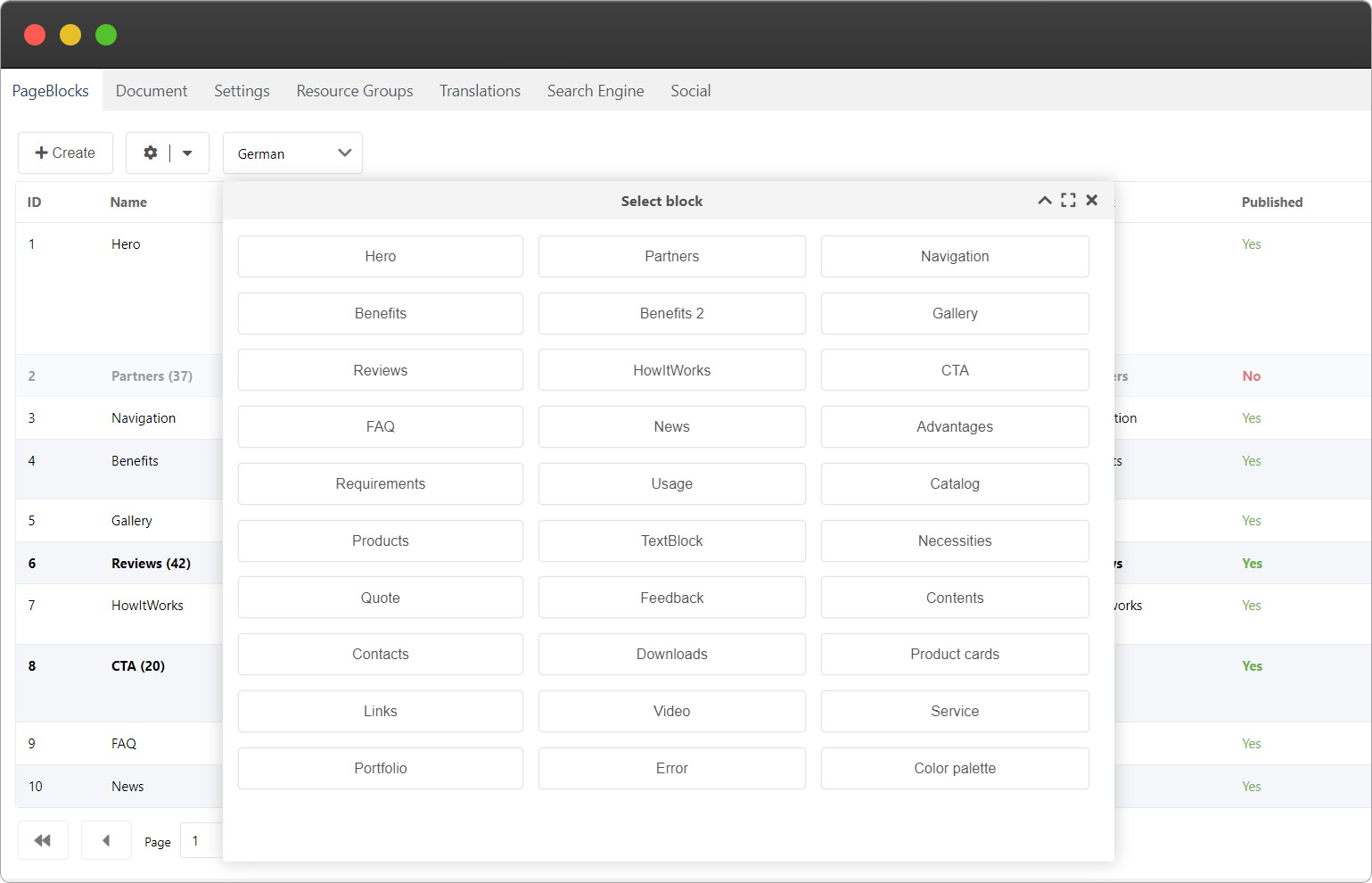
Pick a block from the list, fill in the fields, reorder, publish. The markup stays as it is — a developer described it once.
- Reorder blocks by dragging
- Deleted items wait in the bin
- Versions: roll back to any edit
Gets by without code
Blocks, tables, fields, tabs, panels and menus are created right in the manager. A first site on PageBlocks can be built without opening an editor.
- 39 field types
- Tables with search and filters
- Seven snippets for MODX templates
Keeps the logic in the repository
Controllers, routes, middleware, validation rules, templates and the API are plain files in your IDE: under version control, visible in a diff, open to review.
- Eloquent models and Phinx migrations
- Your own routes and middleware
- REST API with tokens and OpenAPI
Why choose PageBlocks
A block of any structure
A block type is described once — a name, a chunk or a file template, a set of fields — and from then on it goes onto any page. An editor picks it from a list, fills in the form and reorders by dragging. Fields live in JSON, so a new one costs neither a migration nor a column: add it in the constructor and output it in the template.
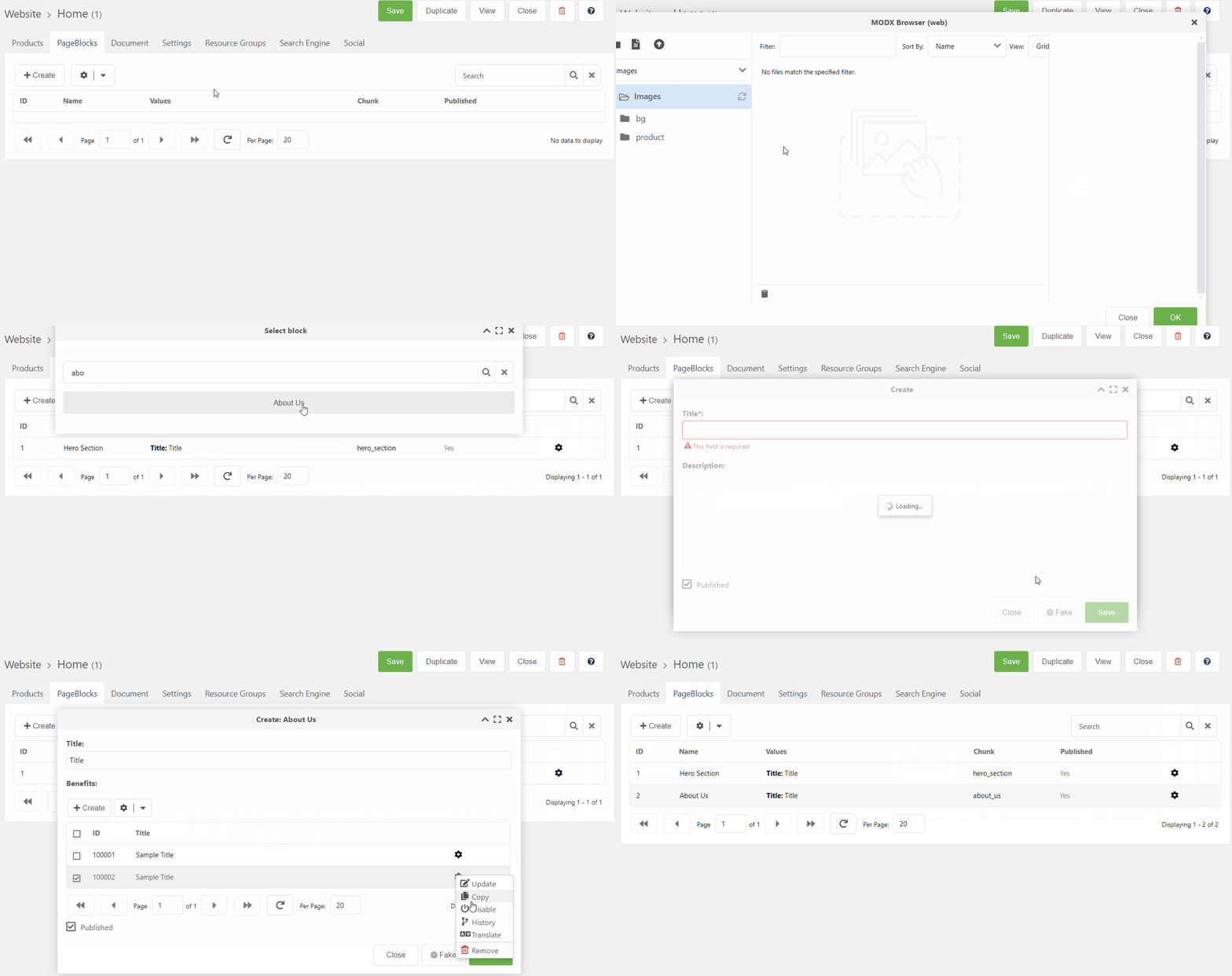
39 types of fields for blocks and tables
Text, numbers, dates, files, images, video, maps, relations between records. Fields describe the structure of a block or a table row — and an editor fills in exactly what is needed, with nothing extra.
Tables as part of the content
Repeating data — slides, specifications, team members, a price list — lives in a table and attaches to a block through a single field. Rows are edited right in the form of the block. Grid columns are configured separately from form fields: eight ways to render a cell, several fields in one column, and a fallback to the first non-empty value.
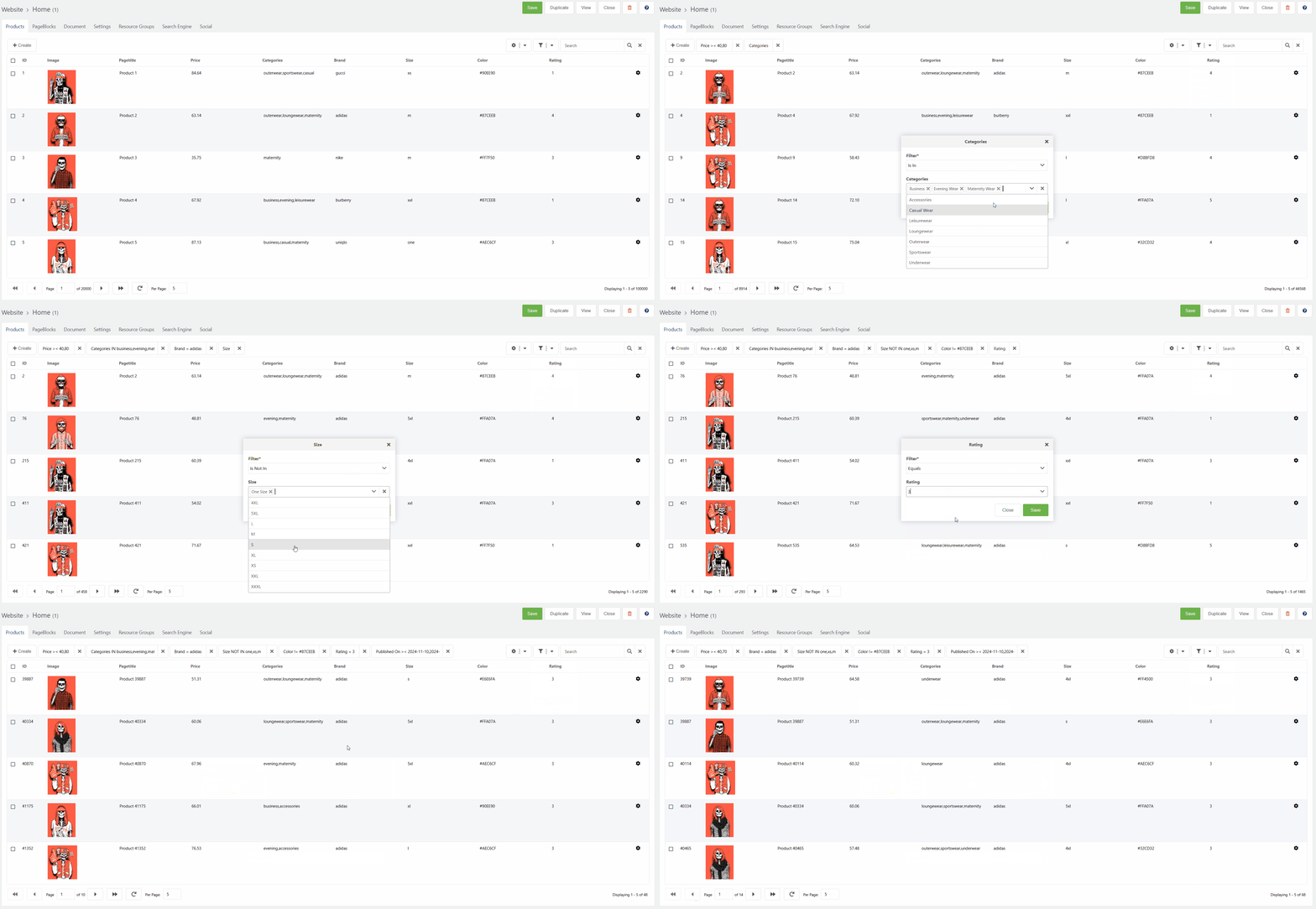
Filters and search without a line of code
The filter form is assembled from the fields of the table on its own, and the pbFilters snippet renders it on the front end — no template to write. The operator follows the type of the field: equals, greater, less, between, before, after, contains, starts with, is in a list — thirteen of them. Every table also gets system filters by creation, update and publication date, and the sets you need often become buttons in the toolbar.
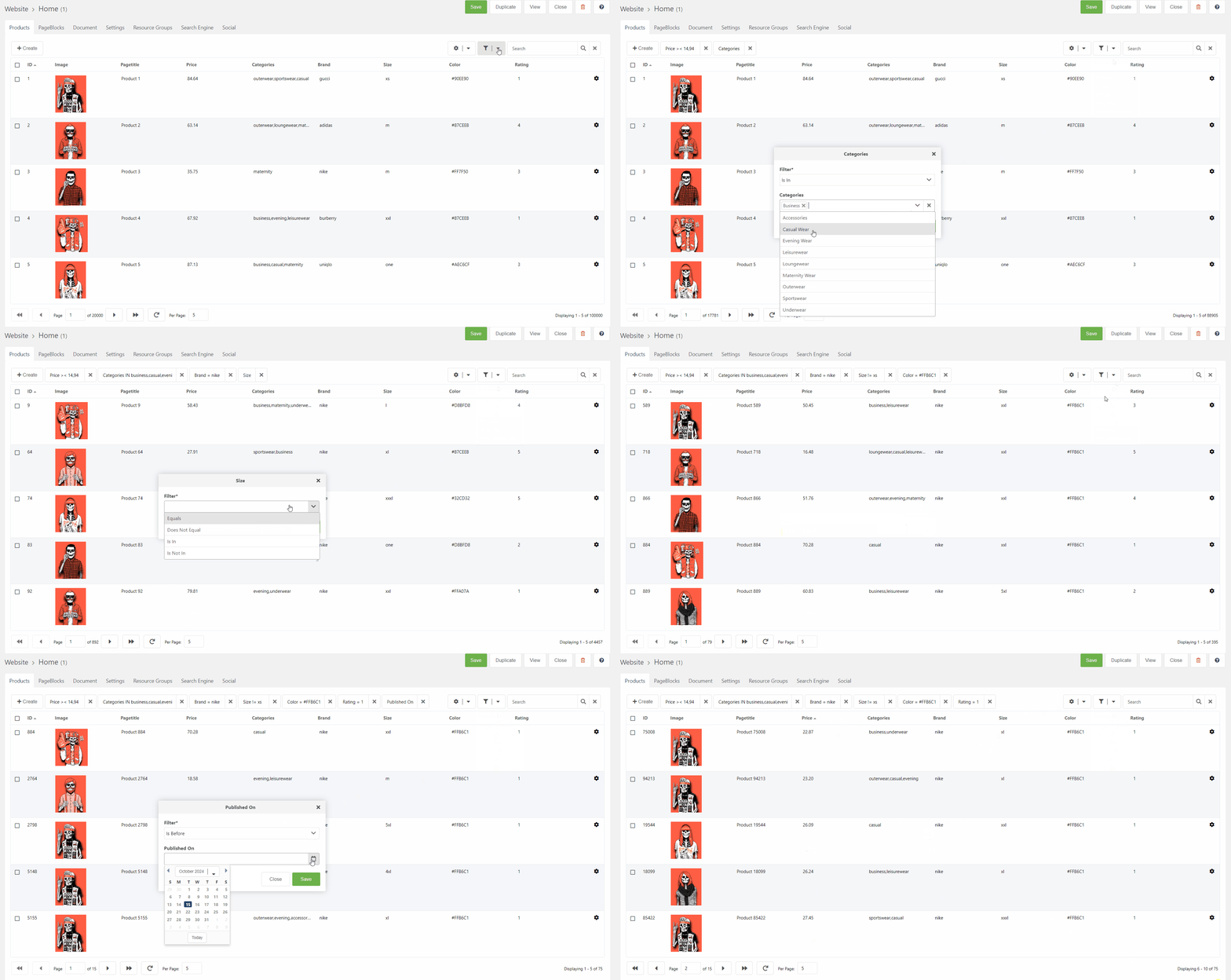
Reusable blocks
One block across many pages: the phone number in the header, a promo banner, the legal details. Edit it in one place and it changes everywhere it stands. So the picker does not fill up with noise, visibility is narrowed by six conditions: template, parent, specific resources, user groups, users, model.
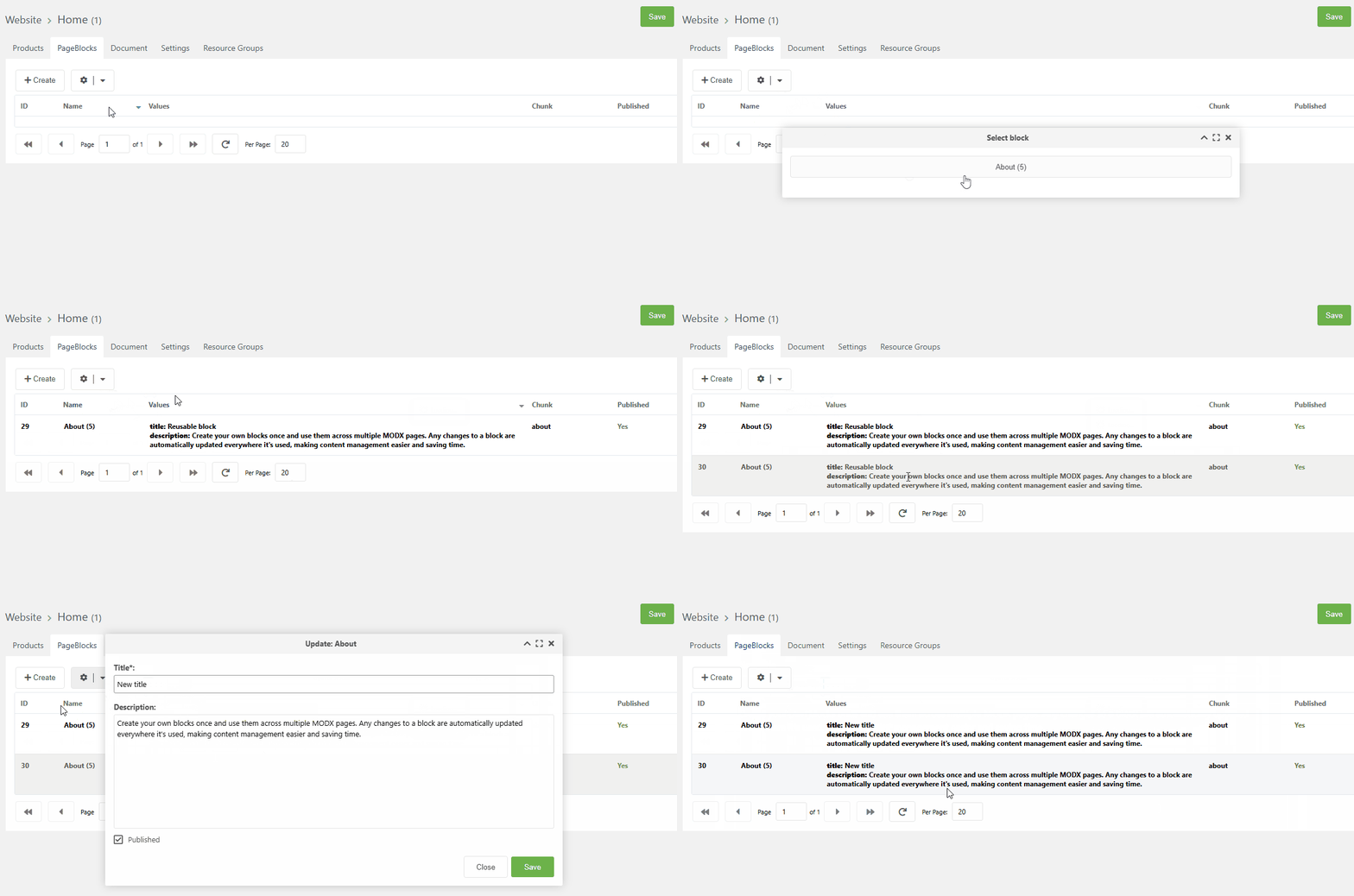
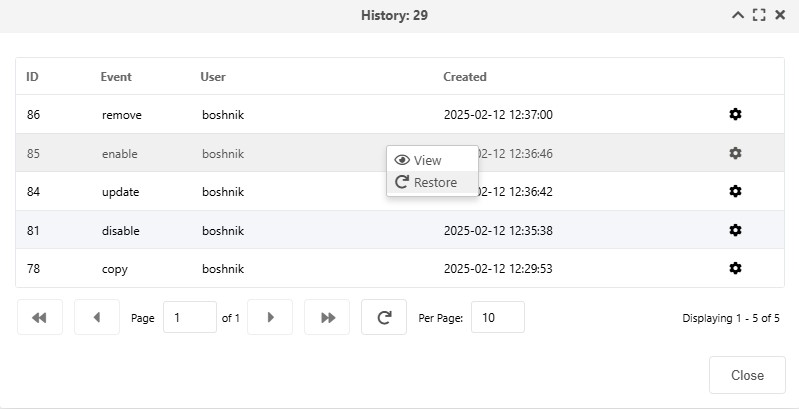
Versions
Creating, editing, copying and deleting a block or a table are recorded automatically — nested tables included. Any snapshot is restored with one button, so an editor can experiment freely: there is no way for them to break a page beyond undo.
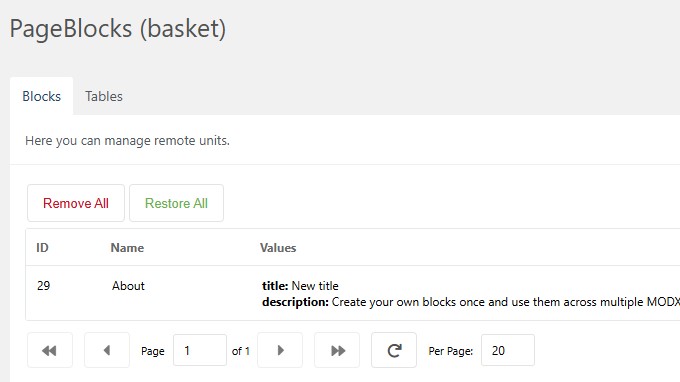
Recycle bin
Deleted blocks, tables and rows do not vanish at once — they sit in the bin and come back as they were. Restoring also revives synchronisation: copies of a reusable block start receiving edits again. Only deleting from the bin itself is final.
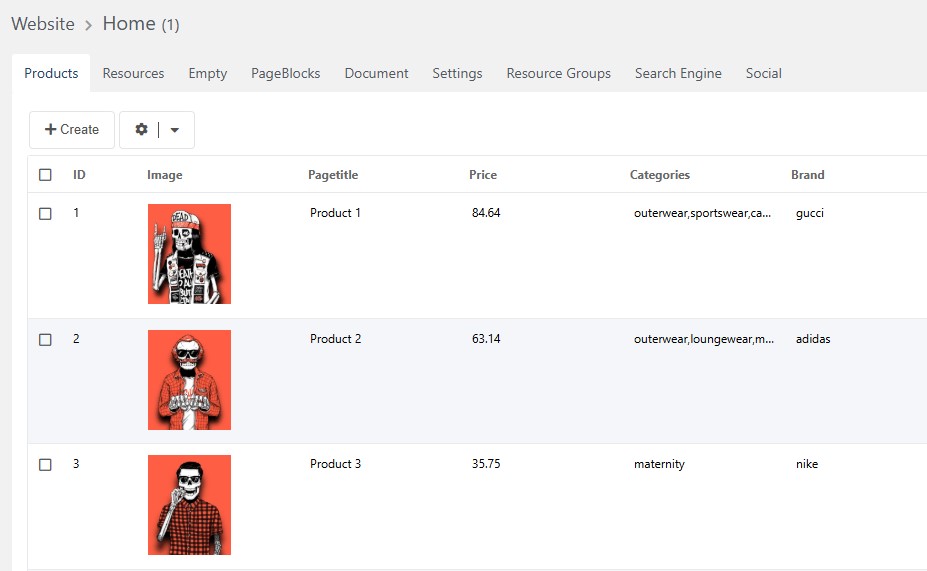
Your own fields on resources and users
Tabs and panels on the MODX resource and user forms — with the same fields the constructor uses everywhere else. This replaces a pile of TVs: three placements to choose from — a separate tab, a collapsible panel, or right among the standard fields. Resource values go into its properties and travel with it when duplicated; user values go into the profile.
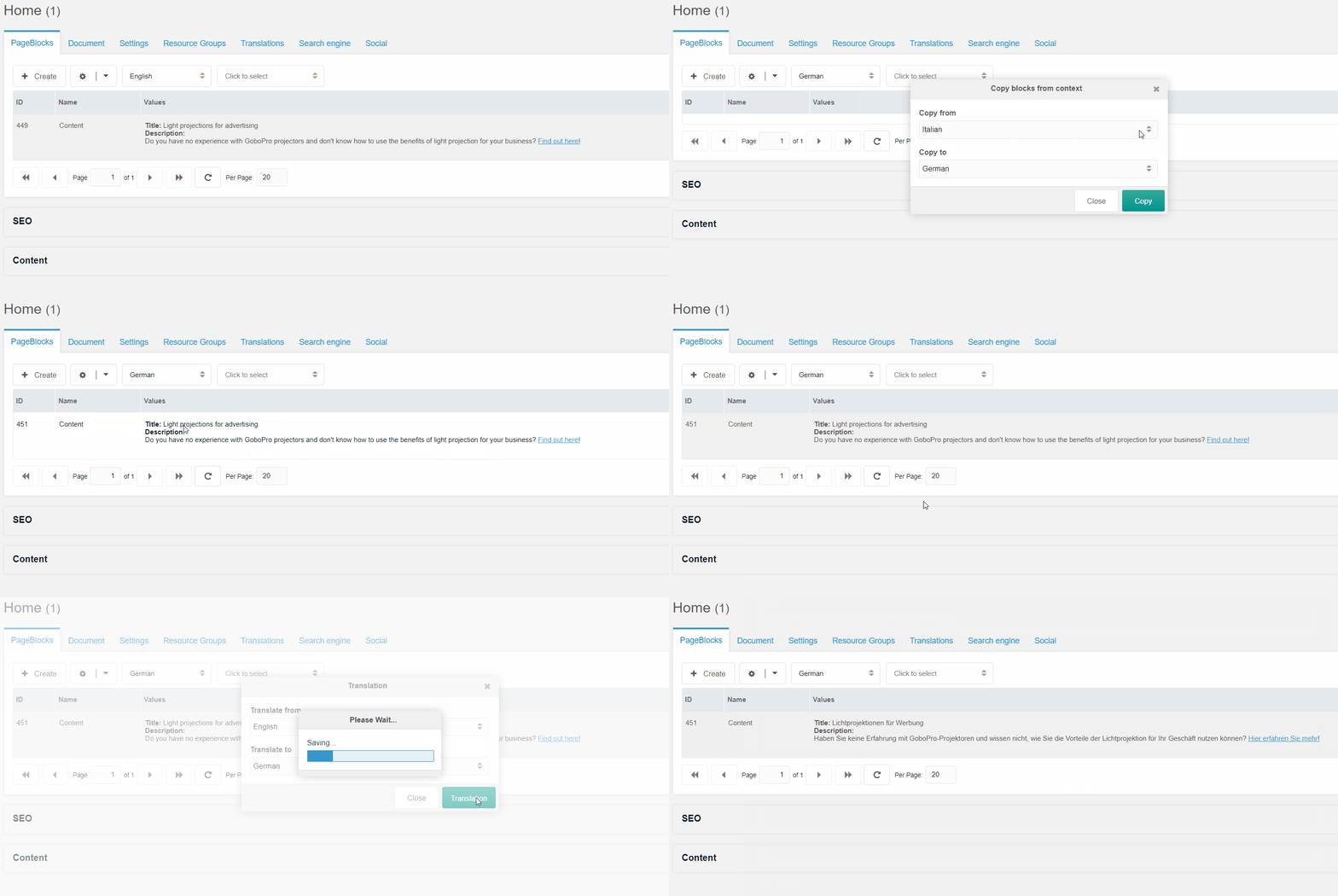
Multilingual without copies of the tree
No duplicated resources and no separate MODX contexts: the language is an attribute of a block, a table row and a resource. What has not been translated stays a single copy and needs no attention. The main language lives without a prefix in the URL, the rest get their own. Each language can carry its own system settings: site name, sender address for mail.
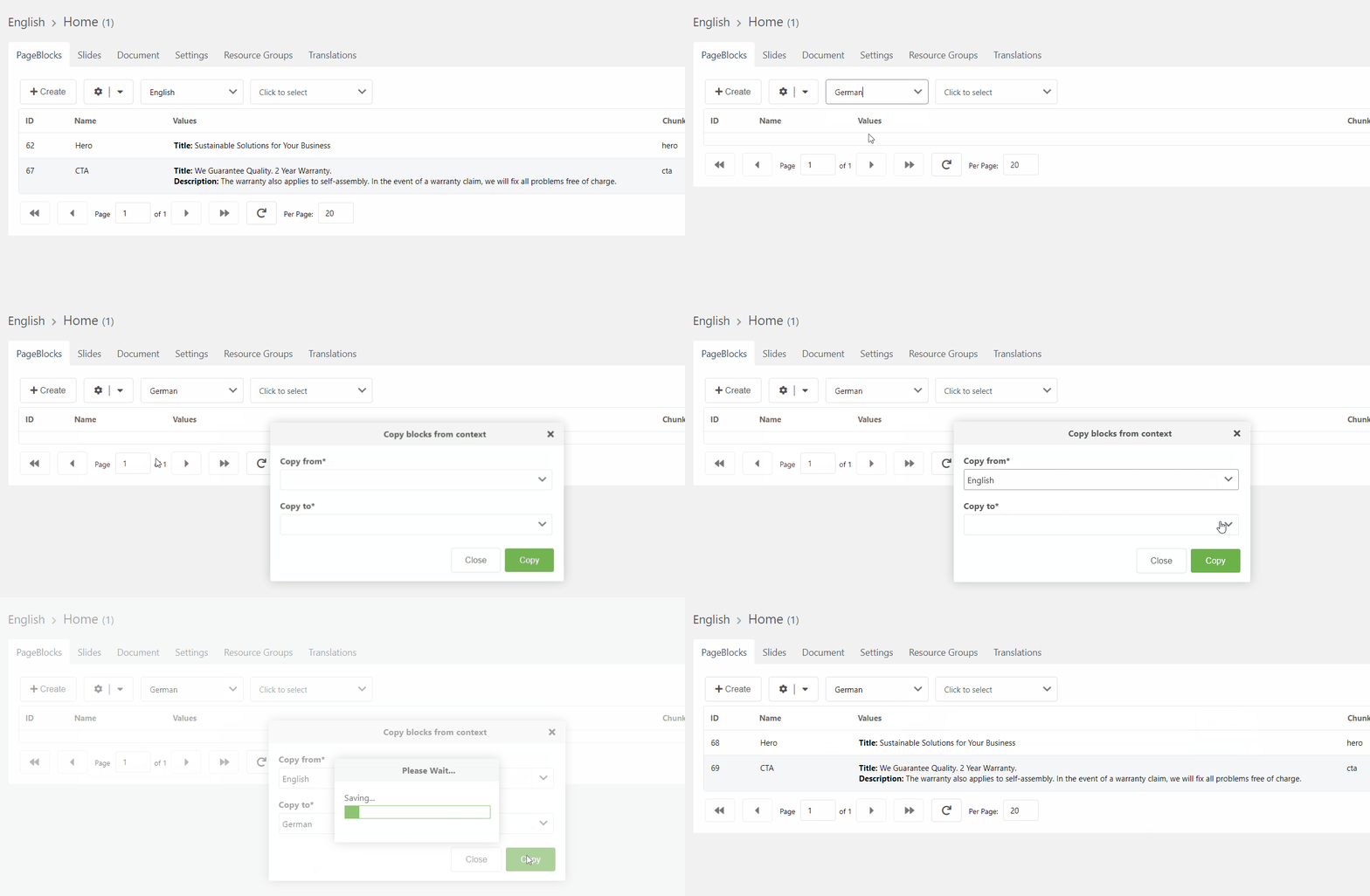
Machine translation from the manager
Translate a field or a table row right in the manager, with five providers to choose from. For the language models the prompt is configurable — by default it asks for the translation only, preserving HTML and placeholders. A provider failure breaks nothing: the original text comes back and the reason goes into the MODX log.
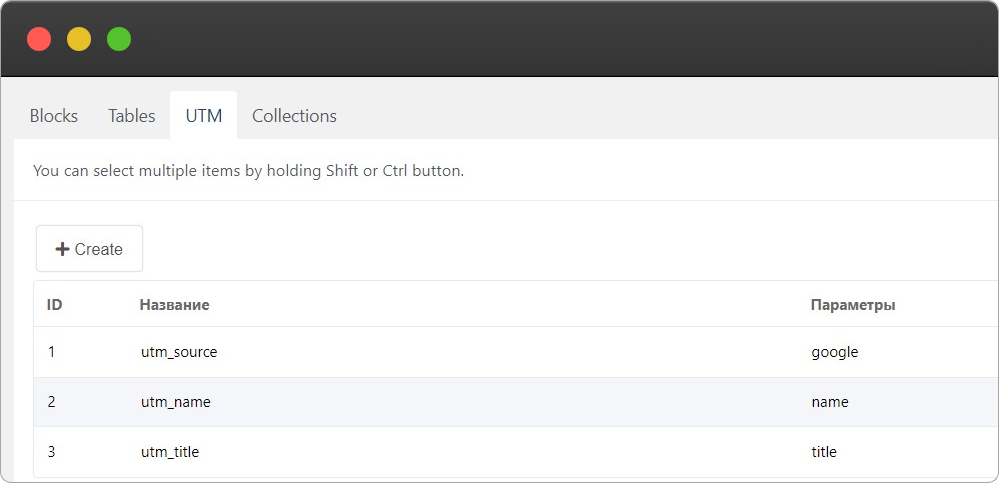
UTM tags
A tag is a name for a set of URL parameters. A block tied to one appears only when the parameters match: its own headline for an ad group, its own promo for a channel, its own offer in an A/B test. A block with no tag always shows, so a direct visit still gets a whole page.
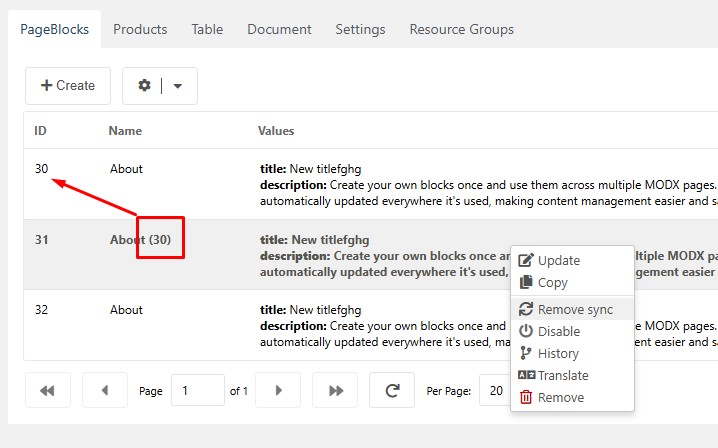
Block synchronisation
Ties blocks that are already placed: an edit to any of them reaches the rest, with no leader and no follower. The set of synced fields can be narrowed — keep the text shared but leave every page its own image. Values diverge, structure does not.
REST API and tokens
Any constructor table is published to an external API with a checkbox: a public name, a set of fields, the allowed operations. Tokens are issued in the manager — with scopes like orders.read, an expiry date and an owning user; only a hash is kept on the server. Filters, search, sorting, field and relation selection are query parameters. The OpenAPI spec and Swagger UI are generated, so they cannot drift from the code.
# Токен выпускается в менеджере, права — orders.read
curl -H "Authorization: Bearer $TOKEN" \
  "/api/pb/v1/objects/orders?filter[status]=new&sort=-id&limit=20"

{
  "success": true,
  "data": [ { "id": 184, "status": "new" } ],
  "meta": { "total": 37, "limit": 20 }
}The small things usually missing
Things other projects write a custom extra for, or patch the core to get. Here they already ship.
Asked most often
MODX 3.0+ and PHP 8.2+. The installer checks both: Eloquent 12 and Phinx 0.16 simply do not run on older PHP.
The block and table constructor, the whole framework, seven snippets, the recycle bin and the everyday set of fields. It is a working page builder, not a demo: you can build and run a site on it.
Install the paid package over the free one — the package name is the same, so to MODX that is an update — and paste the key you bought into the Customer API key field in the install window. The free build carries no license code at all, so there is no setting to paste a key into instead. You do not have to uninstall the free version, and no data is touched.
No. Seven snippets reach PageBlocks from a plain MODX template — paste a call and get the output, with no controllers and no routes. Moving to the framework as a whole can be gradual, or can never happen at all.
The composition of blocks and tables lives in the database, where the editor edits it every day. The output logic lives in files in the repository. Moving a construction from development to production is what the constructor backup is for: the whole thing in a single file.
Deleted blocks and rows go to the recycle bin and can be restored. Blocks and tables keep a history of edits with a rollback to any snapshot. Only deleting from the bin itself is final.
Check out PageBlocks
It is more than a block builder. The documentation covers everything it is made of.
Read documentationCreate websites with ease
Creating a table is free; building a managed section around it is paid.
Basic
- 30 field types
- Block Builder
- Block presets
- Table Builder
- Table Export
- Basket
- Response cache & rate limiting
- Mail journal & queue
- PDF documents
- Pending migrations banner
- UTM
- Block synchronization
- Resource & user sections
- Menu builder
- Migrations from the manager
- Import an existing table
- Multilanguage
- Versions
- Routing & redirects
- REST API, tokens, API docs
- Moderation, search, filters
- Custom table actions
- Constructor backup
- Telegram Support
Single license
The year is updates and support, not the right to use the component. When it runs out the site keeps working on the same domain — new releases and answers to your questions stop, and nothing is switched off.
Versions released while your year was running stay yours: an update you skipped can still be installed afterwards.
- 39 field types
- Block Builder
- Block presets
- Table Builder
- Table Export
- Basket
- Response cache & rate limiting
- Mail journal & queue
- PDF documents
- Pending migrations banner
- UTM
- Block synchronization
- Resource & user sections
- Menu builder
- Migrations from the manager
- Import an existing table
- Multilanguage
- Versions
- Routing & redirects
- REST API, tokens, API docs
- Moderation, search, filters
- Custom table actions
- Constructor backup
- Telegram Support
One site, subdomains included
The license covers one domain, and subdomains of it come with it. A second site is a second license.
Moving to another domain
Install on the new domain and paste the same key. Ask us to release the old one and the slot comes free — up to twice a year. Releasing cannot switch the old install off: the key already there is checked offline.
How the key reaches you
After the purchase you get an api_key by email and paste it into the Customer API key field in the package install window. You do not name your domain when buying — the component reports its own.
Development hosts need no license
On localhost, a bare IP, a name with no dot or the .test, .local and .localhost zones no key is asked for and the component does not go to the network at all. A copy on such a host does not use up your site.